Most programmatic buying happens in the open auction. Any buyer can bid, the highest bid wins, and nobody knows in advance who will show up. It is fast and it scales, but it gives the buyer very little control over where the ads run and what the price will be.
For many campaigns that is not enough. A brand may want a specific publisher. An agency may need a fixed price it can promise to a client. A publisher may want to sell its best placements to a few trusted buyers instead of to everyone. All of these needs are solved the same way: with a deal, and a deal ID that tells every system in the chain which agreement an impression belongs to.
This guide explains what a deal ID is, the four ways to buy programmatic inventory (open auction, private marketplace, preferred deal and programmatic guaranteed), how a deal ID travels through a bid request, how to set up a deal step by step, and the most common reasons a deal fails to deliver.
What Is a Deal ID in Programmatic Advertising?
A deal ID is a unique code that links an impression to an agreement made in advance between a buyer and a seller. The seller, usually a publisher or its SSP, creates the deal and shares the ID with the buyer. The buyer enters the same ID in its DSP. From that moment, both sides can recognise the deal when it appears in an auction.
The agreement behind the ID sets the terms. It can include the price, the type of auction, the placements included, the formats, the dates and the buyers who are allowed to bid. The deal ID itself is only the label. The terms live in the SSP and the DSP settings.
Deal IDs are part of the OpenRTB standard, the common language most DSPs and SSPs use. When a seller has a deal on an impression, it adds the deal details to the bid request it sends to buyers. When the buyer bids on that deal, it sends the deal ID back in its bid response. That is how both sides match the impression, the price and the report.
The Four Ways to Buy Programmatic Inventory
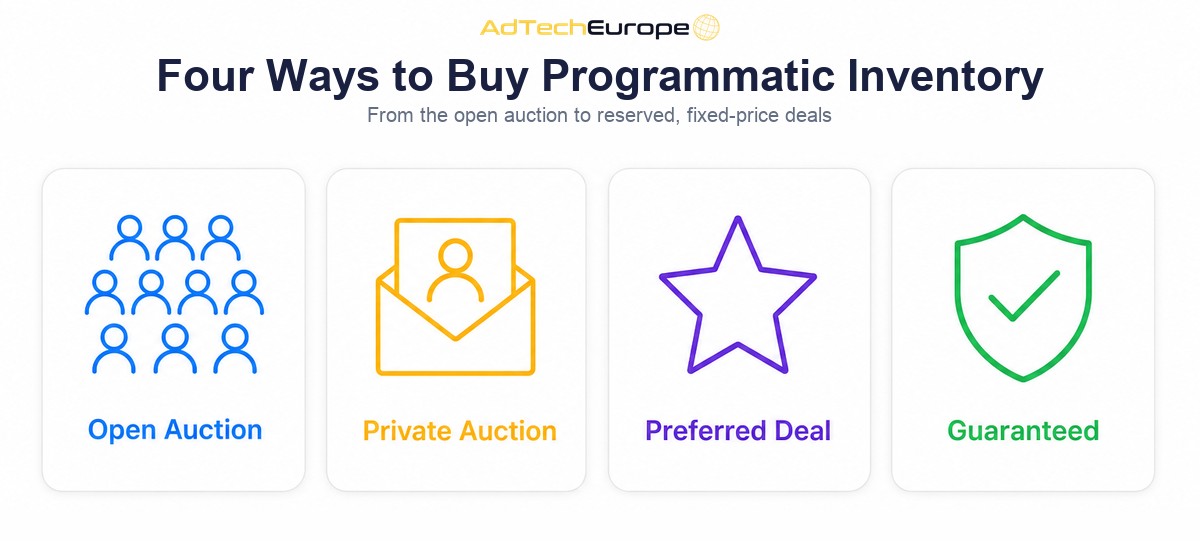
Programmatic buying is often split into four transaction types. They differ in who can bid, how the price is set and whether volume is promised. The table gives a quick overview.
| Type | Who can bid | Price | Volume promised | Deal ID |
| Open auction | Any approved buyer | Auction, above the floor | No | No |
| Private marketplace (PMP) | Invited buyers only | Auction, above a deal floor | No | Yes |
| Preferred deal | One buyer | Fixed price | No | Yes |
| Programmatic guaranteed | One buyer | Fixed price | Yes | Yes |
Open Auction
The open auction is the default. The SSP sends a bid request to many DSPs at once, and the highest eligible bid wins. If you want the full sequence, our guide on how real-time bidding works walks through it step by step. The open auction gives the widest reach and the least control. Prices move with demand, and the buyer often sees only the domain or app, not the full context of the placement.
Private Marketplace (PMP)
A private marketplace, also called a private auction, is an auction with an invitation list. The publisher chooses which buyers can take part, sets a floor price for the deal and often limits it to its better placements. The invited buyers still compete with each other, so the final price can be higher than the floor. There is no volume promise. If buyers bid too low or not at all, the impressions go back to the open auction or another deal.
Preferred Deal
A preferred deal is a one-to-one agreement at a fixed price, without a volume promise. The buyer gets a first look at the impressions in the deal before they reach the open auction. The buyer can choose to bid or to pass on each impression. If it passes, the seller can sell that impression elsewhere. Preferred deals suit buyers who want a set price and priority access, but who do not want to commit to a fixed number of impressions.
Programmatic Guaranteed
Programmatic guaranteed is the closest thing to a traditional direct media buy, run through programmatic pipes. The buyer and the seller agree on a fixed price and a fixed number of impressions over a set period. The seller reserves that inventory for the buyer. The buyer, in turn, is expected to bid on the impressions it receives, because declining them breaks the delivery plan on both sides. It gives the most certainty and the least flexibility.
How a Deal ID Travels Through a Bid Request
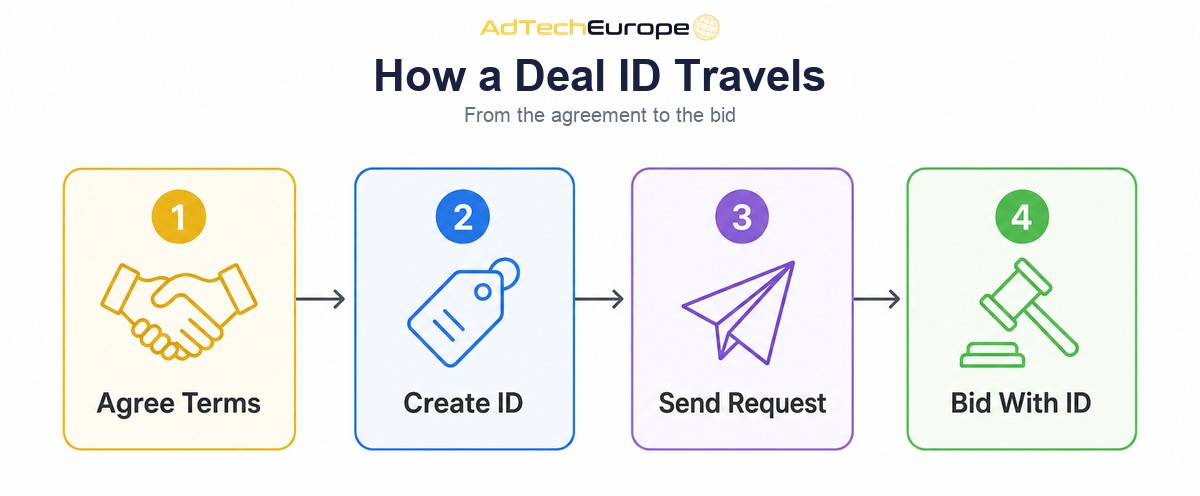
A deal does not change how real-time bidding works. It adds information to the same flow. Here is what happens to a single impression that belongs to a deal:
- The terms are agreed. The buyer and the seller agree the deal type, price, dates, placements and formats.
- The seller creates the deal ID. The SSP stores the terms and generates a unique ID, which is sent to the buyer.
- The buyer adds the ID to its DSP. The deal ID is attached to a campaign or a line item, with the right creatives and targeting.
- The impression comes up. When a user loads a page or app that matches the deal, the SSP adds the deal object to the bid request.
- The DSP bids with the deal ID. If the campaign wants the impression, the DSP returns a bid that carries the same deal ID.
- The seller checks and serves. The SSP confirms that the bid matches the deal terms, picks the winner and serves the ad. Both sides report the impression under that deal ID.
In OpenRTB, the deal information sits inside the impression object. The key fields are:
| Field | Where | What it does |
| pmp | Impression | Holds the private marketplace details for this impression |
| private_auction | pmp | 1 means only bids on the listed deals are eligible; 0 means open auction bids are also accepted |
| deals | pmp | The list of deals that apply to this impression |
| id | Deal | The deal ID the buyer must send back |
| bidfloor | Deal | The minimum price for this deal, or the fixed price on a fixed-price deal |
| at | Deal | The auction type for this deal, including a fixed-price option |
| wseat / wadomain | Deal | Optional lists of buyer seats or advertiser domains allowed to bid |
| dealid | Bid response | The deal ID the DSP is bidding on |
OpenRTB 2.6 also added a field to mark whether a deal is guaranteed, which helps both sides treat programmatic guaranteed deals differently from unreserved ones. Exact field support varies by SSP, so always check the integration documentation of each partner.
When to Use Each Deal Type
There is no single best deal type. Each one fits a different goal. As a rule of thumb:
- Use the open auction for reach, testing and performance campaigns where price efficiency matters more than the exact placement.
- Use a private marketplace when you want better-quality placements from a known publisher but still want to compete on price.
- Use a preferred deal when you want priority access and a predictable price, but your volume needs change from day to day.
- Use programmatic guaranteed when a campaign needs a fixed number of impressions on specific placements, such as a launch, a sponsorship or a client plan with set delivery.
Many buyers combine them. A common setup is a guaranteed or preferred deal with a key publisher for the core of the plan, a few PMPs for quality reach, and the open auction for scale. Deal buying also works well with supply path optimization, because a deal often gives you a direct and known path to the publisher instead of the same impression offered through several resellers.
How to Set Up a Deal Step by Step
Setting up a deal is mostly about making sure both sides agree on the same details. Small mismatches are the main reason deals fail. Use this checklist:
- Agree the terms in writing. Deal type, price, currency, start and end dates, formats, sizes, placements, countries and, for guaranteed deals, the number of impressions.
- Confirm your buyer seat. Many sellers target a deal to a specific buyer seat ID. Make sure the seller has the right seat for your DSP account.
- Receive the deal ID. Copy it exactly. Deal IDs are case-sensitive in many systems and a single wrong character breaks the match.
- Create the campaign or line item. Attach the deal ID, set the bid at or above the deal price, and add creatives in the agreed formats and sizes.
- Keep targeting light. The seller already filters the inventory. Extra targeting in the DSP, such as narrow geo, device or audience rules, can stop the campaign from bidding at all.
- Get creatives approved early. Many publishers review creatives before a deal goes live. Leave time for this.
- Watch the first day. Check bid requests, bids, wins and impressions on the deal. If requests arrive but bids do not, the problem is in the DSP setup. If no requests arrive, the problem is on the seller side.
Why Deals Fail to Deliver
A deal that is live but not delivering is one of the most common support tickets in programmatic buying. The table lists the usual causes and the first thing to check.
| Symptom | Likely cause | What to check |
| No bid requests with the deal ID | Deal not active, wrong seat, or no matching traffic | Deal status and buyer seat ID in the SSP |
| Requests arrive, DSP does not bid | Targeting too narrow, budget or frequency cap reached | Campaign targeting, budget and caps |
| DSP bids, but loses | Bid below the deal floor, or another buyer wins the PMP | Bid price versus the deal floor and currency |
| Bids rejected | Creative size, format or advertiser domain not allowed | Creative specs and allowed advertiser domains |
| Delivery behind plan on a guaranteed deal | DSP passing on too many impressions | Filters that make the DSP skip deal impressions |
Good reporting makes these problems easy to find. You need to see bid requests, bids, wins and impressions broken down by deal ID, not only campaign totals. A transparent supply chain helps too. Checking the seller in ads.txt and sellers.json confirms that the SSP offering the deal is authorised to sell that publisher’s inventory.
Deals, Curation and Quality
Deals were first built around single publishers. Today many deals are packaged by curators, who group placements from many sites and apps into one deal ID based on quality, audience or context. The buyer gets one ID to activate instead of dozens. The value of a curated deal depends entirely on how well the placements are checked and how often the list is updated.
The same idea works inside a DSP without a deal ID. The Curated Marketplace add-on for AdTech Europe’s DSP, according to its product page, offers ready-made placement lists that are checked for traffic quality, content and click behaviour, re-scored every day, and applied to a campaign from the campaign form. Buyers can also save their own whitelists and reuse them across campaigns.
On the publisher side, the Publisher Ad Server add-on lets a publisher book fixed-price direct deals with priorities, dates and pacing, set floors per zone, and send the remaining impressions to the auction. Direct deals run first and the auction fills what is left. It is the publisher’s version of the same question: which buyers get which impressions, at what price.
What Deals Mean If You Own the Platform
For a buyer on a rented, shared platform, deals are something you request and wait for. When you own the platform, deals become part of what you can offer. A DSP owner can work with SSP partners to activate deals for its own advertisers, report by deal ID and decide how deal campaigns are priced. An SSP or ad exchange owner can create deals for its publishers and sell premium supply to selected buyers. A network that runs both sides can package its best placements into deals and sell them under its own brand.
This is where ownership changes the economics. On a platform you rent access to, the deal terms, reporting and margins are set by someone else. On a platform you run under your own brand, they are yours to set.
As of November 2026, AdTech Europe’s pricing page lists the DSP at $500 per month to rent (plus a one-time setup fee equal to one month on monthly plans, or $5,000 a year with no setup fee), $25,000 for a license or 12 payments of $2,500, and $50,000 to own the complete source code or 12 payments of $5,000. The SSP and ADX are offered in the same three ways. Always check the pricing page for current terms.
Ready to Run Deals on Your Own Platform?
AdTech Europe helps agencies, ad networks, media-buying teams and adtech entrepreneurs run their own DSP, SSP and ad exchange under their own brand. You choose to rent, license or own the source code, and you keep control of your supply partners, your deals and your margins.
If you want to see how deal buying, curated placement lists and direct publisher deals would work on your own platform, schedule a programmatic strategy meeting with our team.
FAQs
What is a deal ID in programmatic advertising?
A deal ID is a unique code that links an impression to a pre-agreed deal between a buyer and a seller. The seller adds it to the bid request, and the buyer sends it back in the bid. Both sides use it to apply the agreed price and terms and to report on the deal.
What is the difference between a PMP and a preferred deal?
A private marketplace is an invitation-only auction where several approved buyers compete above a floor price. A preferred deal is a one-to-one agreement at a fixed price with first look at the impressions. Neither promises a set volume.
What is programmatic guaranteed?
Programmatic guaranteed is a deal with a fixed price and a fixed number of impressions over a set period, reserved for one buyer. It works like a direct media buy, but the impressions are delivered through programmatic bid requests and responses.
Why is my deal ID not delivering?
The most common causes are a deal that is not active, a wrong buyer seat ID, DSP targeting that is too narrow, a bid below the deal floor, or creatives that do not match the agreed sizes or advertiser domains. Check whether bid requests with the deal ID arrive first, then whether your DSP bids on them.
Do deals cost more than the open auction?
Often, yes, because deals usually cover better placements and give more control. But the price is only one part of the picture. A deal can reduce wasted spend on low-quality placements, so compare results per outcome, not only CPM.
Can I run deals on my own DSP?
Yes. A DSP that supports OpenRTB deal objects can bid on deal IDs from its SSP partners. When you own or license the platform, you also control how deals are activated, reported and priced for your own advertisers.