Many media buyers notice something odd when they look closely at their DSP logs. They set a maximum bid of $5.00 CPM on a campaign, yet the bids that actually leave the platform are often lower, and the prices they pay are lower still. It can look like the DSP is ignoring the settings. In most cases it is doing exactly what it was built to do.
The reason is a change in how programmatic auctions price their winners. Most exchanges now run first-price auctions, where the winner pays exactly what it bid. In that world, bidding your full value on every impression is the fastest way to overpay. Bid shading is the logic a buying platform uses to bid less than the maximum while still winning the impressions that matter.
This guide explains what bid shading is, why first-price auctions made it necessary, how shading algorithms decide what to bid, which settings and reports buyers should watch, and what changes when you own the bidding logic instead of renting it.
What Is Bid Shading?
Bid shading is the practice of submitting a bid below the highest price a buyer is willing to pay, with the aim of winning the impression at a lower cost. The buyer’s maximum is the ceiling. The shaded bid is an estimate of the lowest price that is still likely to win.
A simple way to picture it: you value an impression at $4.00 CPM. If the strongest competing bid is $2.60, a bid of $4.00 wins and costs $4.00. A bid of $2.80 also wins, and costs $2.80. Both outcomes deliver the same impression to the same user. The second one leaves $1.20 per thousand impressions in your budget. Bid shading is the attempt to find that lower winning number, auction after auction, without knowing the competing bids in advance.
These numbers are a hypothetical illustration, not a benchmark. Real shading decisions are made in milliseconds, on every bid request, using whatever signals the platform has about past auctions.
First-Price vs Second-Price Auctions
To understand why shading exists, you need to know how the two common auction types set the winning price. Our step-by-step guide on how real-time bidding works covers the full auction flow; here we focus on pricing.
| Auction type | What the winner pays | Best bidding behaviour | Main risk for buyers |
| Second-price | One small increment above the second-highest bid | Bid your true value; the auction lowers the price for you | Hidden or dynamic floors that quietly raise the clearing price |
| First-price | Exactly the amount it bid | Bid below your true value, as close to the winning price as possible | Overpaying on every win if bids are not shaded |
In a second-price auction, honesty is rewarded. You bid what the impression is worth to you, and if you win, you pay just above the runner-up. The auction does the shading on your behalf.
In a first-price auction, that protection disappears. Whatever you bid is what you pay. If you keep bidding your full value, you win the same impressions as before but pay more for each one. The work of finding the right price moves from the exchange to the buyer’s platform.
Why the Industry Moved to First-Price
The shift happened gradually in the late 2010s and was driven largely by header bidding. When a publisher runs several exchanges side by side, each one returns its best bid and the publisher’s ad server compares them. Second-price logic does not work well across that kind of multi-step comparison, and some exchanges were adjusting prices in ways buyers could not see. First-price auctions made the process simpler and more transparent: the bid that leaves the DSP is the price that gets compared and paid. Google Ad Manager completed its move to a unified first-price auction in 2019, and it is now the common model across most major exchanges. If you want the background on how publishers combine demand sources, see our guide to header bidding vs waterfall.
How a DSP Knows Which Auction It Is In
The OpenRTB bid request tells the buyer. The at field carries the auction type: a value of 1 means first-price, and a value of 2 means second-price plus. The request can also include a bidfloor and bidfloorcur on each impression, which set the minimum price the seller will accept. A well-built DSP reads these fields on every request and adjusts its bidding behaviour accordingly. Our breakdown of what a bid request contains shows where these fields sit in the full object.
How Bid Shading Works Inside a DSP
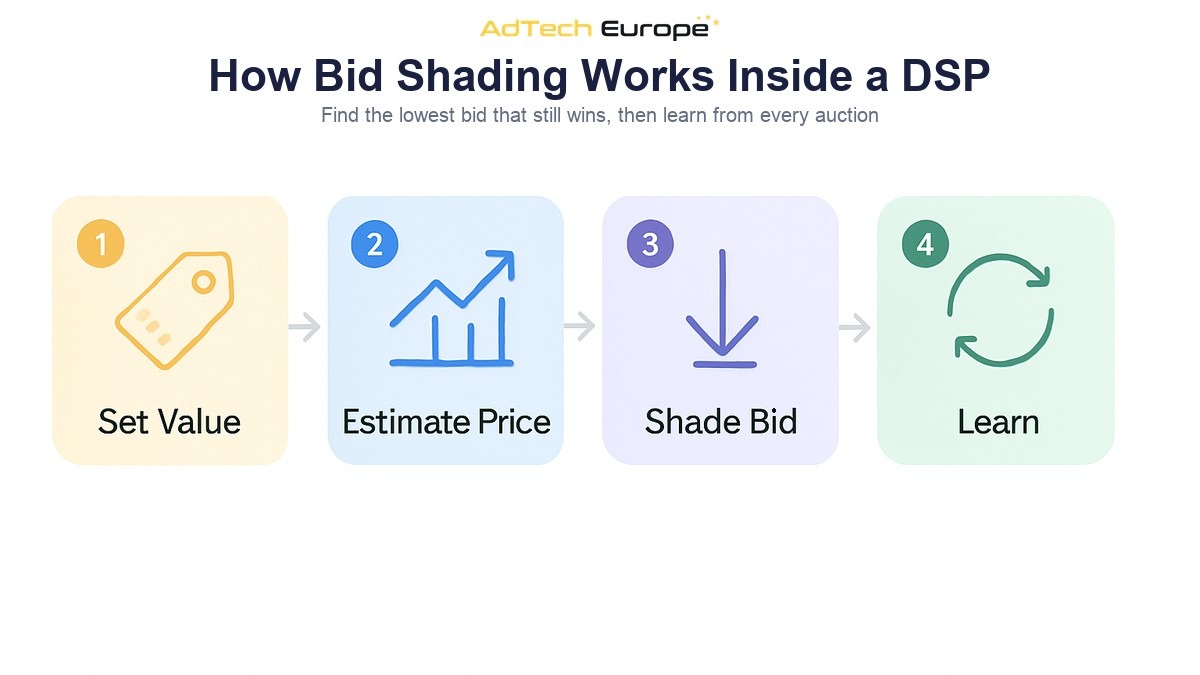
Every shading system answers the same question: what is the lowest bid that still has a good chance of winning this impression? The details vary between platforms, but the process usually follows four steps.
- Set the value. The campaign decides what the impression is worth. This comes from the advertiser’s maximum CPM, a CPA or CTR target converted into a bid, or an optimization model that scores the user and placement.
- Estimate the winning price. The platform predicts the price needed to win, based on what it has learned from similar auctions: the same exchange, publisher, ad size, device, country and time of day.
- Shade the bid. The bid is reduced from the full value towards the predicted winning price, never above the campaign’s maximum and never below the floor in the request.
- Learn from the result. Win notices, loss notices and clearing prices feed back into the model so the next estimate is better.
The feedback step is what makes shading work. A platform that only knows whether it won or lost learns slowly. A platform that also receives the clearing price on wins, and in some cases the minimum price that would have won on losses, can tune its estimates much faster. Some exchanges share that minimum-bid-to-win information with bidders after the auction; others share nothing beyond the win notice.
Common Shading Approaches
| Approach | How it works | Strength | Weakness |
| Fixed reduction | Bids a set share of the maximum on every first-price request | Simple and predictable | Ignores how competitive each auction really is |
| Floor-based | Bids a small margin above the floor in the request | Uses a signal present in every request | Floors do not always reflect real competition |
| Win-rate curve | Models the chance of winning at each price and picks the bid with the best value | Adapts per exchange, placement and audience | Needs enough auction history to be reliable |
| Feedback-driven | Adjusts bids using clearing prices and minimum-bid-to-win data | Learns quickly where the data exists | Only as good as what each exchange shares |
Most mature platforms combine several of these. A new line item might start with a simple floor-based rule and switch to a modelled approach once there is enough history on that supply.
Buy-Side vs Sell-Side Shading
Shading can happen in two places. Buy-side shading runs inside the DSP, under the buyer’s control. Sell-side shading is offered by some exchanges and SSPs, which lower the buyer’s bid before the final auction. The second option can save money, but the buyer cannot see how it works and the seller has its own incentives. Buyers who care about predictable costs usually prefer shading they can configure and audit inside their own platform.
The Trade-Off: Savings vs Win Rate
Bid shading is a balancing act. Shade too little and you overpay. Shade too much and you lose auctions you would have been happy to win, which slows delivery and can push the campaign onto lower-quality supply where competition is weaker.
| Situation | What you see in reports | What it usually means |
| Under-shading | High win rate, clearing price close to the maximum bid | You are winning, but paying more than the auction required |
| Over-shading | Low win rate, under-delivery, spend shifting to cheaper placements | Bids are too low to compete on the supply you want |
| Healthy shading | Stable delivery, steady win rate, clearing price clearly below the maximum | The platform is finding winning prices without giving away budget |
There is no single correct win rate. A prospecting campaign on broad supply can run comfortably at a low win rate because there are plenty of impressions available. A retargeting campaign with a small audience may need a much higher win rate, because every lost auction is a lost chance to reach a user who already knows the brand. Our guide to DSP reporting metrics explains how win rate, bid rate and effective CPM fit together.
What to Watch in Your DSP Reports
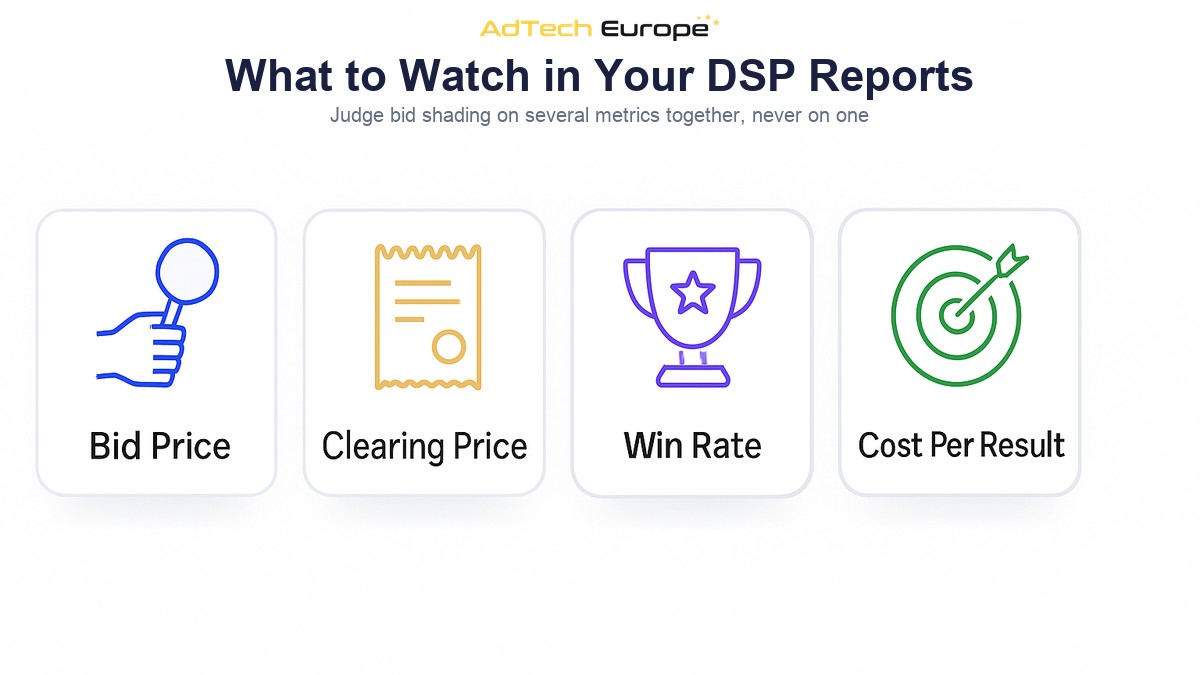
You cannot judge bid shading from one number. Look at a small set of metrics together, broken down by exchange and placement.
- Bid price vs maximum bid: how far below the ceiling your bids actually go. If they sit at the maximum on first-price supply, shading is not active.
- Clearing price: what you actually paid per thousand impressions. On first-price auctions this should equal your bid, minus any adjustments the exchange applies.
- Win rate: wins divided by bids. Watch the trend after any change to shading settings or maximum bids.
- Effective CPM and CPA: the cost that matters to the advertiser. Savings on CPM are only useful if conversion quality holds.
- Auction type mix: how much of your spend runs through first-price versus second-price supply. Shading should only apply to the first.
- Delivery pace: whether daily budgets are spent evenly. A sudden drop after a shading change is a warning sign.
The same supply can look very different through different paths. An impression bought through a reseller may carry extra fees or a different auction type from the same impression bought directly. Cleaning up those paths with supply path optimization gives shading models cleaner data to learn from, because fewer duplicate auctions compete for the same impression.
Common Bid Shading Mistakes
Most problems with bid shading come from settings that work against each other, not from the shading logic itself.
Raising the Maximum Bid to Fix Delivery
When a campaign under-delivers, the first reaction is often to raise the maximum bid. On first-price supply, this can increase cost without fixing the real issue. If the shading model is too aggressive, a higher ceiling simply gives it more room to overpay on the auctions it was already winning. Check win rate by exchange first.
Applying First-Price Logic to Second-Price Auctions
Shading a bid in a second-price auction does not save money, because the price is already set by the runner-up. It only lowers your chance of winning. A DSP should read the auction type in each request and switch behaviour, rather than applying one rule to everything.
Ignoring Floors
A shaded bid below the floor in the request is wasted processing. It cannot win. Good shading logic treats the floor as a hard lower limit and skips requests where the floor is already above the campaign’s maximum.
Judging Shading on CPM Alone
A lower CPM is not a win if the campaign drifts to placements that never convert. Always compare cost per result before and after a shading change, not just the price of the impression.
Changing Too Many Settings at Once
Adjusting maximum bids, shading strength, targeting and frequency caps on the same day makes it impossible to see which change moved the results. Change one thing, give the model time to adapt, then review.
Who Controls the Bidding Logic?
On a rented self-serve platform, bid shading is usually a black box. The vendor decides how aggressive it is, which signals it uses and whether you can turn it off. You see the results in your reports but cannot inspect or change the method. For a single advertiser that may be acceptable. For an agency or ad network managing many clients, the bidding logic directly shapes margin and delivery on every campaign.
| Control area | Rented self-serve DSP | DSP you own |
| Maximum bids, bid ranges and pacing | Configurable within the vendor’s limits | Configurable for every client and campaign |
| Shading method | Vendor’s choice, usually hidden | With full source code, yours to build, change and audit |
| Auction and win data | Summarised in vendor reports | Available in your own platform for analysis |
| Which exchanges you bid on | The vendor’s connected supply | Your choice of SSP and exchange partners |
The AdTech Europe DSP platform includes real-time bidding, budget and bidding controls with daily limits, bid ranges and pacing, and automatic CPA and CTR optimization. Licensed and white-label owners configure those controls; owners who choose a full acquisition with source code can go further and build or change the bidding logic itself, including how bids are shaded on first-price supply.
Ready to Own Your Bidding Logic?
AdTech Europe supplies enterprise demand-side platform technology to agencies, ad networks, media buying teams and adtech entrepreneurs who want to own their buying stack instead of renting one. Every plan includes unlimited QPS scaling, 1,000+ SSP integrations, white-label branding and lifetime free upgrades, so your bidding rules, supply choices and auction data stay under your control.
As of October 2026, the options are a managed White Label DSP at $500 per month with no setup fee, a DSP License at $25,000 one-time, or a full DSP Acquisition with complete source code ownership at $50,000 one-time, with instalment plans available on the two ownership tiers. Current figures are always on the DSP pricing page. To plan a bidding setup around your own clients and supply, schedule a programmatic strategy meeting with our team.
FAQs
What is bid shading in programmatic advertising?
Bid shading is when a buying platform bids less than the advertiser’s maximum price in order to win impressions at a lower cost. It is mainly used in first-price auctions, where the winner pays exactly what it bid.
Why do first-price auctions need bid shading?
In a first-price auction, the bid is the price. Bidding full value on every impression means paying full value on every win. Shading lowers each bid towards the price actually needed to win.
Does bid shading lower my win rate?
It can. Lower bids lose some auctions that a full-value bid would have won. Good shading keeps the win rate stable on the supply you care about while reducing the price paid on each win.
How does a DSP know if an auction is first-price or second-price?
The OpenRTB bid request includes an auction type field called at. A value of 1 means first-price and a value of 2 means second-price plus. The DSP reads it on every request.
Should bid shading be used in second-price auctions?
Generally no. In a second-price auction the winner pays just above the runner-up, so the auction already lowers the price. Shading there mostly reduces your chance of winning without saving money.
Can I control how my DSP shades bids?
On most rented platforms, shading is set by the vendor. On a platform you own, you control bids, ranges and pacing, and with full source code ownership you can change the shading logic itself.