
Television used to be bought in advance, in bulk, by the spot. You picked a channel and a time slot, agreed a price with a sales team, and learned weeks later roughly how many people had watched. Streaming changed that. When a show is delivered over the internet to a smart TV, the ad break inside it can be sold one impression at a time, in real time, to the buyer who values that viewer most.
That makes connected TV one of the few premium screens that a programmatic buyer can reach with the same tools used for web and mobile. It also brings new rules. There is no cursor and usually no click. Several people may be watching the same screen. The ad is often stitched into the video stream by a server, so the request your platform receives may not come from the TV at all.
This guide explains what CTV programmatic advertising is, how a CTV impression is bought through a demand-side platform, what a CTV bid request contains, how to target, measure and protect CTV campaigns, and why controlling your own buying platform matters more on the TV screen than almost anywhere else.
What Is CTV Programmatic Advertising?
CTV programmatic advertising is the automated buying of video ads that play inside streaming content on an internet-connected television. The television might be a smart TV with built-in apps, or an ordinary screen connected to a streaming stick, a set-top box or a games console. The ads run in the breaks of streaming apps, and each impression can be offered to buyers through an auction or a pre-agreed deal.
Three terms are often used as if they mean the same thing. They do not, and the difference matters when you set up a campaign.
| Term | What it describes | Can it be bought programmatically? |
| CTV (Connected TV) | The device: a television screen connected to the internet | Yes, through SSPs and exchanges that carry streaming app supply |
| OTT (Over-the-Top) | The delivery method: video streamed over the internet instead of cable or satellite, on any screen | Yes, on TV, mobile, tablet and desktop |
| Linear TV | Traditional scheduled broadcast, cable and satellite channels | Mostly sold directly, not through open real-time auctions |
| Addressable TV | Showing different ads to different households watching the same programme | Partly, depending on the operator and market |
Put simply, CTV is where the ad is seen and OTT is how the content gets there. A streaming app on a smart TV is both. The same app watched on a phone is OTT but not CTV. For a buyer, that distinction decides the creative, the price and the way success is measured.
How a CTV Ad Is Bought Through a DSP
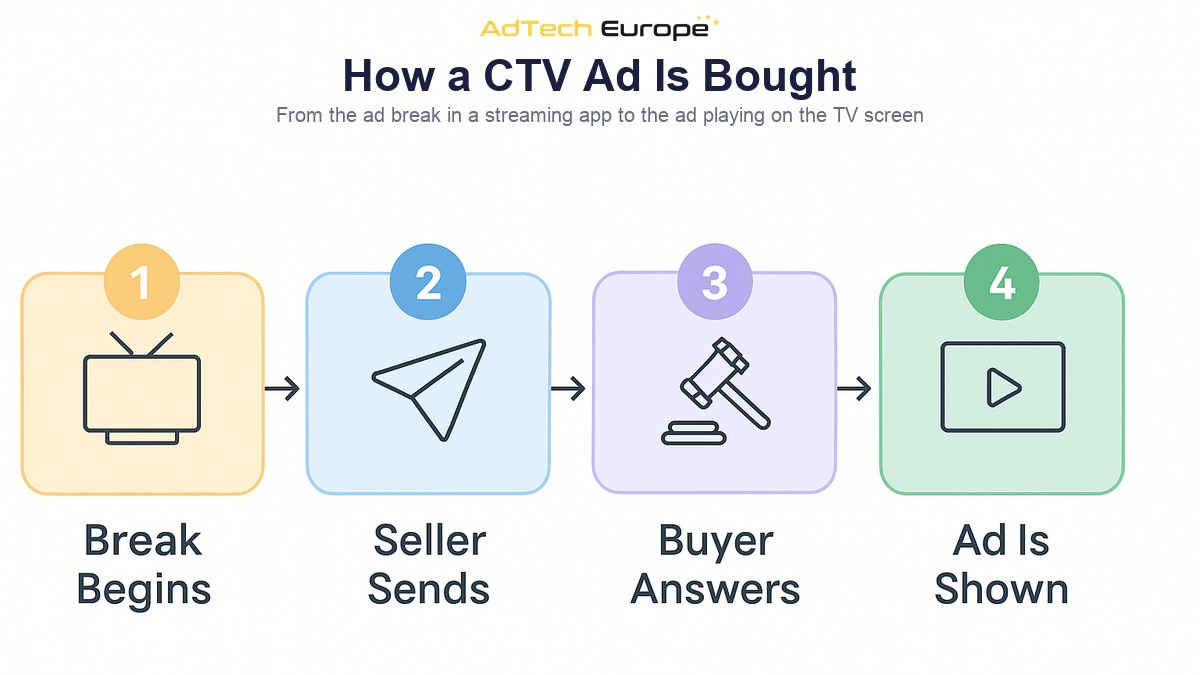
The mechanics follow the same real-time bidding pattern as web and app inventory, with a few TV-specific steps in the middle.
- The show reaches an ad break. A viewer is watching a streaming app, and the content reaches a pre-roll, mid-roll or post-roll break.
- The app or its ad server asks for ads. Either the TV app requests ads directly, or a server that assembles the video stream does it on the viewer’s behalf.
- An SSP builds a bid request. The supply-side platform describes the break, the app, the content and the device in an OpenRTB bid request and sends it to connected buyers.
- Your DSP decides and bids. Your platform matches the request against eligible CTV campaigns, checks targeting and frequency, and returns a price with a video creative reference.
- The winning ad plays. The creative is delivered using VAST, the standard video ad template, and plays full-screen inside the break. Tracking events fire as the ad starts, progresses and completes.
Step two hides the most important technical choice in CTV. With client-side ad insertion, the app on the TV fetches and plays the ad itself. With server-side ad insertion (SSAI), a server stitches the ad directly into the video stream before it reaches the TV. SSAI gives viewers smoother playback, so it is widespread in streaming. The trade-off is that the bid request and tracking calls often come from that server, not the television. The seller must forward the device’s real IP address and user agent, or targeting and fraud checks will see the server instead of the viewer.
What Makes CTV Different From Web and Mobile Buying
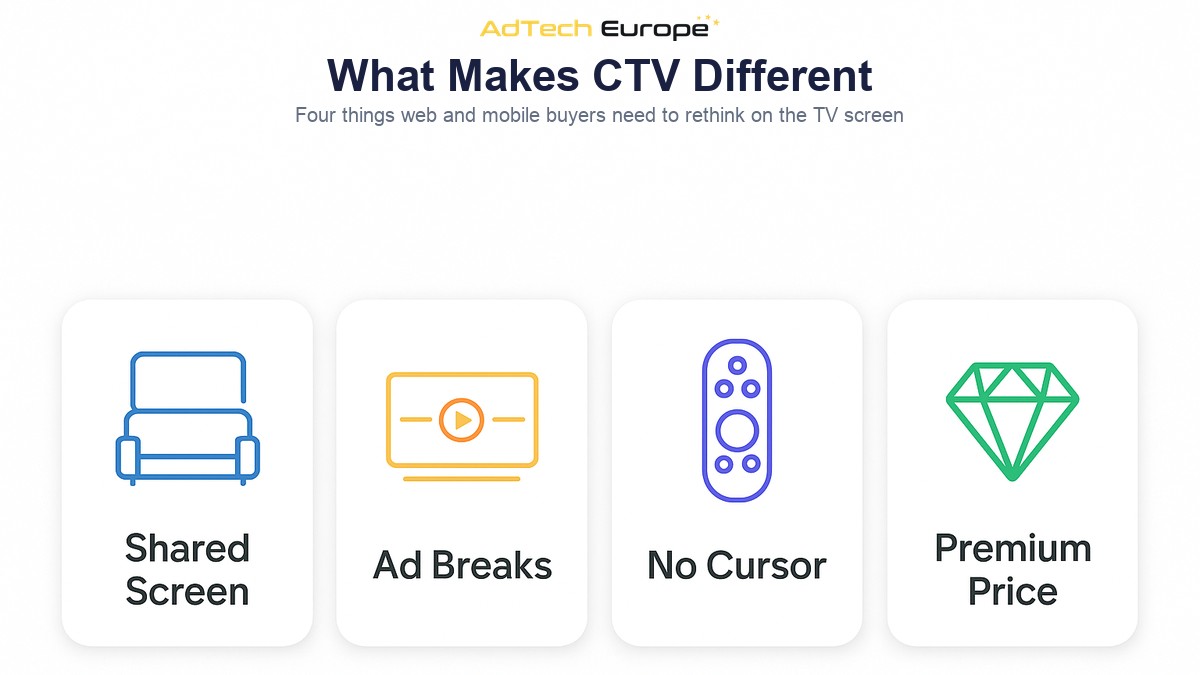
Buyers moving budget from display or mobile into CTV often keep the same assumptions. Four differences break most of them.
The screen is shared
A phone usually belongs to one person. A living-room TV belongs to a household. The identifiers available on a TV describe the device and, through the IP address, the home — not a single individual. Audience targeting in CTV is therefore household targeting, and campaign planning should assume that one impression may be seen by more than one person, or by nobody if the room is empty.
Ads run in breaks
CTV ads rarely sit beside content. They interrupt it, often in groups of several ads played back to back, known as an ad pod. A pod is closer to a traditional TV commercial break than to a banner slot. Recent versions of OpenRTB added fields that describe pods, such as the pod’s total duration and the position of each slot, so that buyers can bid on a specific place in the break and sellers can prevent two competing brands from appearing next to each other.
There is no click
Most TV viewers hold a remote, not a mouse, and most CTV ads cannot be clicked. Any campaign optimised on click-through rate will have nothing to optimise on. Success is measured through completion, reach, frequency and outcomes that happen later on another device, such as a site visit or a search.
Supply is concentrated and valuable
A small number of streaming apps, device makers and publishers control much of the CTV supply, and a lot of it is sold through private deals rather than the open auction. Floor prices are usually well above web display, and that value is exactly what attracts fraudsters.
What a CTV Bid Request Contains
A CTV bid request uses the same OpenRTB structure as any other request, covered in our guide to what a bid request contains. What changes is which fields are filled in and which ones your platform must read to buy well. Streaming apps are apps, so a CTV request carries an app object rather than a site object.
| Field | What it tells you | Why it matters in CTV |
| device.devicetype | The kind of device, with separate values for connected TV and set-top box | The simplest way to confirm the impression is on a TV screen |
| app.bundle | The streaming app’s store identifier | App allowlists, blocklists and app-ads.txt checks |
| imp.video | Accepted durations, file types, placement and start delay | Whether your creative is eligible, and whether it is pre-roll or mid-roll |
| Pod fields | Pod identifier, pod duration and slot position | Bidding on the first or last slot in a break, competitive separation |
| app.content | Genre, series, title, language, rating, live or on-demand | Contextual targeting and brand suitability |
| device.ifa | The device’s advertising identifier, where the viewer allows it | Frequency capping, audiences and attribution at device level |
| device.ip / device.ua | The network address and user agent of the viewer’s device | Geo, household matching and fraud checks, if forwarded correctly under SSAI |
The quality of these fields varies widely between supply sources. Some sellers send detailed content data and accurate device information. Others send a generic app name, an empty content object and a server IP address. Two requests that look identical in a campaign report can carry very different amounts of information, and the ones with less information are harder to price, harder to target and easier to fake.
Targeting Options for CTV Campaigns
CTV targeting combines ideas from television planning with signals from programmatic buying. The options that work reliably are:
- Geography. Country, region and city derived from the household IP address. Useful for regional brands and store-based businesses.
- Device and platform. Smart TV, streaming stick, set-top box or console, and the operating system each one runs.
- App and publisher. Allowlists of streaming apps you trust, or blocklists of those you do not.
- Content and genre. Sports, news, drama, kids or live events, where the seller passes content data.
- Daypart. Time-of-day windows, which matter more on a TV than on a phone because viewing is concentrated in the evening.
- Household audiences. First-party or partner data matched to households, subject to the consent and privacy rules of each market.
A practical rule: be strict on supply and broad on audience. Narrow audience filters combined with a narrow app list often leave a campaign with almost nothing to bid on.
CTV Creative Requirements
A CTV ad is watched on the largest screen in the house, often from across the room. Some creative that works on a phone does not work there at all.
- Video only. CTV supply is video. Banner, native and push creatives are not eligible.
- Standard spot lengths. Most breaks accept spots of 15 or 30 seconds. Check the accepted durations in each request rather than assuming.
- High resolution. Supply several encodings so the player can pick the best one for the connection, including a high-definition file.
- VAST, not VPAID. Interactive VPAID units generally do not run on television devices or in server-side insertion. Plain VAST with linear video is the safe choice.
- Readable from a distance. Large text, a clear brand frame and a spoken message. Many CTV advertisers add an on-screen QR code or a short web address so viewers can respond on their phone.
Measuring CTV Campaigns Without Clicks
Because there is no click, CTV measurement relies on what the player reports and on what happens afterwards on other devices. The core metrics are:
| Metric | What it measures | What to watch for |
| Video completion rate | Share of started ads that played to the end | Naturally high on TV; unusually perfect numbers can signal fake traffic |
| Cost per completed view | Spend divided by completed views | A fairer efficiency measure than CPM when durations differ |
| Unique household reach | How many different homes saw the ad | Depends on consistent device or IP identifiers across requests |
| Frequency | Average exposures per household | Rises fast on narrow app lists |
| Cross-device outcomes | Site visits, app installs or conversions from exposed households | Usually matched by IP address, so treat as directional, not exact |
Set expectations before launch. CTV rarely wins a last-click comparison against search or social, because its job is reach on a screen people pay attention to. Judge it on reach, completion and lift from exposed households.
CTV Fraud and Supply Quality
High prices attract invalid traffic, and CTV has specific weak points. The most common schemes pretend to be something they are not: ordinary mobile or web traffic labelled as a TV device, a small app claiming to be a well-known streaming service, or fake server-side insertion traffic where requests appear to come from a legitimate stitching server but no real viewer exists.
The defences are mostly the same transparency tools used elsewhere in programmatic, applied more strictly:
- app-ads.txt. CTV app developers publish an app-ads.txt file listing who is authorised to sell their inventory. Bid only where the seller in the request appears in that file. Our guide to ads.txt, app-ads.txt and sellers.json explains how the check works.
- sellers.json and the supply chain object. Confirm every intermediary in the path is identified, and prefer paths with few resellers.
- Device consistency checks. A request that claims to be a TV but carries a mobile user agent, or a household IP that behaves like a data centre, should be refused before bidding.
- Direct or short supply paths. The same streaming app is often available through several resellers at different prices and different levels of trust. Choosing the shortest verified route is the idea behind supply path optimization, and it pays off quickly on expensive CTV impressions.
Frequency Capping on a Shared Screen
Frequency is one of the most common complaints from CTV viewers and one of the easiest ways to waste a CTV budget. Streaming sessions are long, breaks are regular, and a household watching one app all evening can see the same spot many times if nothing stops it.
Capping on TV is harder than on the web because identifiers are less stable. Some requests carry a device advertising ID, some only an IP address, and a server-side stitched stream may present the same household in different ways across breaks. A sensible setup caps per device ID where one is present, falls back to a household-level key where it is not, and adds a per-session or per-pod limit so the same brand never appears twice in one break. The general principles of setting caps by campaign goal are covered in our guide to frequency capping in programmatic advertising.
Why Platform Ownership Matters for CTV Buying
Almost everything that separates a good CTV campaign from a wasteful one depends on the buying platform: which CTV supply partners are connected, which request fields are read and logged, how household frequency keys are built, and which device consistency rules run before a bid is placed.
On a rented DSP seat, those decisions belong to the vendor. You can only buy from the CTV sources they have integrated, target the fields they have chosen to expose, and trust fraud rules you cannot inspect. If an important streaming supply partner is missing, adding it is a request, not a task. On an owned or licensed platform, the supply list, the logging and the filtering rules are yours to set. You can connect CTV-focused SSPs directly, report on device type and content genre in as much detail as you need, and apply the same controls across CTV, web and in-app programmatic advertising from one place.
AdTech Europe’s platform lists programmatic TV — connected TV, OTT and addressable TV — among its supported channels, alongside display, video, native, push and DOOH. The full list is on the advertising formats page.
Ready to Buy CTV on a Platform You Own?

AdTech Europe supplies enterprise demand-side platform technology to agencies, ad networks, media buying teams and adtech entrepreneurs who want to own their buying stack instead of renting one. Every plan includes unlimited QPS scaling, 1,000+ SSP integrations, white-label branding and lifetime free upgrades, so the CTV supply you reach is shaped by your own decisions rather than a vendor’s seat limits.
As of September 2026, the options are a managed White Label DSP at $500 per month with no setup fee, a DSP License at $25,000 one-time, or a full DSP Acquisition with complete source code ownership at $50,000 one-time, with instalment plans available on the two ownership tiers. Current figures are always on the DSP pricing page. To plan a CTV setup around your own clients and supply, schedule a programmatic strategy meeting with our team.
FAQs
What is CTV programmatic advertising?
It is the automated buying of video ads that play inside streaming content on internet-connected televisions. Each impression is offered to buyers through a demand-side platform in real time or through a pre-agreed deal, and the ad plays full-screen in the content’s ad break.
What is the difference between CTV and OTT?
CTV describes the device: a television connected to the internet. OTT describes the delivery method: video streamed over the internet instead of through cable or satellite. A streaming app watched on a smart TV is both CTV and OTT, while the same app on a phone is OTT only.
Can you click on CTV ads?
Usually not. Viewers use a remote control, and most CTV ads are non-clickable video. Advertisers measure completion, reach and frequency instead, and often add a QR code or short web address so viewers can respond on another device.
What is server-side ad insertion in CTV?
Server-side ad insertion, or SSAI, stitches the ad directly into the video stream before it reaches the TV, so playback is smooth. Because a server makes the ad request, sellers must forward the viewer’s real IP address and user agent, or targeting and fraud checks will see the server instead.
How do you target audiences on CTV?
CTV targeting works at household level. Buyers combine geography from the IP address, device type, app and content lists, dayparts and, where consent allows, first-party or partner audience data matched to households.
Why is CTV inventory a fraud target?
CTV impressions are priced well above standard display, so disguising cheap or fake traffic as TV traffic is profitable. Checking app-ads.txt, sellers.json, the supply chain object and device consistency before bidding removes most of the risk.