A campaign report says 120 conversions. The advertiser’s shop says 95. The analytics tool says 80. Everyone is looking at the same campaign, and nobody agrees. This is one of the most common conversations in programmatic buying, and it usually ends with someone losing trust in the numbers.
The disagreement matters because conversions drive everything else. They decide which placements get more budget, which bids go up, and whether a client renews. If the conversion data is wrong or incomplete, the DSP optimises toward the wrong traffic, and the media buyer cannot explain why results look different from one screen to the next.
This guide explains how programmatic attribution works: how a DSP learns that a sale happened, the difference between pixels and server-to-server postbacks, click-through versus view-through credit, attribution models and windows, the most common reasons numbers disagree, and a simple checklist to reconcile them. The example numbers above are an illustration, not real campaign data.
What Is Programmatic Attribution?
Programmatic attribution is the process of linking a result, such as a sale, a lead or an app install, back to the ad impression or click that caused it. The result is called a conversion. Attribution answers one question: which campaign, placement and ad should get the credit?
In a DSP, attribution is not just a reporting feature. It is the feedback loop for buying. A DSP sees each impression through a bid request, decides how much to pay, and then waits to learn whether that impression led to anything valuable. Without conversion data, it can only optimise for clicks or impressions. With good conversion data, it can optimise for cost per acquisition and return on ad spend, the metrics covered in our guide to DSP reporting metrics.
Attribution has three moving parts:
- Tracking: recording the click or impression and the later conversion.
- Matching: connecting that conversion to the right click or impression.
- Crediting: deciding which touchpoint gets the credit when there was more than one.
How Conversion Tracking Works in a DSP
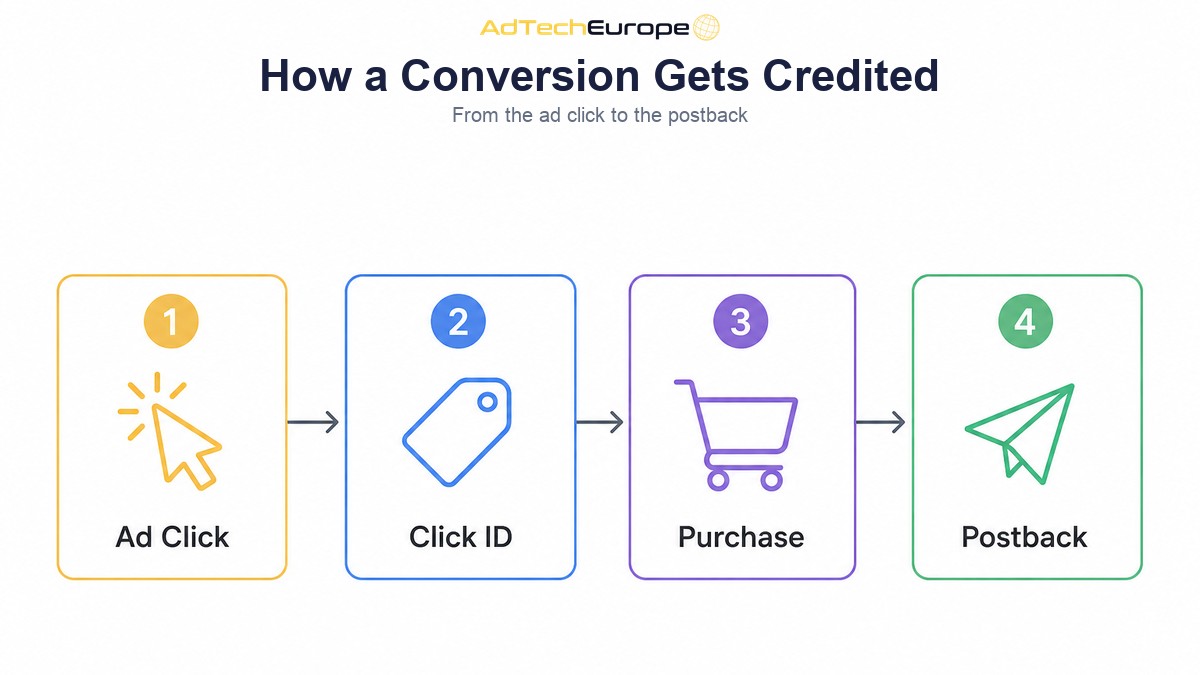
Most performance campaigns in programmatic use click-based tracking. The flow looks the same on almost every platform, even if the names of the parameters change.
- The ad is clicked. The DSP or its tracker records the click and creates a unique click ID.
- The click ID travels with the user. It is added to the landing page URL, for example
?clickid={CLICK_ID}, where the curly-bracket macro is replaced with the real ID at click time. - The site stores the click ID. The landing page, store plugin or advertiser’s tracker saves it, usually in a first-party cookie or in the order record.
- The user converts. They buy, sign up or install, sometimes minutes later and sometimes days later.
- The conversion is reported back. A pixel fires in the browser, or the advertiser’s server sends a postback with the stored click ID.
- The DSP matches and credits. It looks up the click ID, finds the campaign, creative and placement, and adds the conversion to the report.
Every step can break. If the click ID is dropped by a redirect, if the site does not save it, or if the conversion report is sent without it, the DSP has a real sale it can never attribute. That is the root of most missing conversions.
Pixel Tracking vs Server-to-Server Postbacks
There are two main ways to report a conversion back to a DSP. Both have a place, but they behave very differently.
| Pixel (client-side) | Server-to-server postback | |
| How it works | A small script or image tag fires in the user’s browser on the thank-you page | The advertiser’s server or tracker calls the DSP’s postback URL directly |
| What it relies on | Cookies and the browser loading the page fully | The click ID being stored and passed back |
| Ad blockers and browser limits | Can block it or shorten cookie life | Not affected, because no browser is involved |
| Setup effort | Low: paste one tag | Medium: the tracker or store must send the ID |
| Best for | Simple sites and quick tests | Affiliate offers, apps, high-value or high-volume campaigns |
A postback is usually a simple URL call, for example https://track.example/postback?clickid={clickid}&payout={payout}, with the macros replaced by the real values. Because it does not depend on the browser, postback tracking is generally more reliable. Browsers such as Safari, with Intelligent Tracking Prevention, limit how long some script-set cookies last, and ad blockers often stop third-party pixels. Many advertisers run both: a pixel for speed of setup, and a postback as the source of truth.
Click-Through vs View-Through Conversions
Not every conversion follows a click. Someone might see a display or video ad, ignore it, and later type the brand name into a search engine and buy. Attribution handles these two cases separately.
- Click-through conversion: the user clicked the ad and then converted within the click window. This is the strongest, easiest signal to defend.
- View-through conversion: the user saw the ad, did not click, and converted within a shorter view window. This needs an impression-level identifier, so it is harder to track and easier to over-count.
View-through credit is useful for upper-funnel formats like video and CTV, where few people click. It is also the most common source of inflated numbers. A campaign that serves many cheap impressions to people who were going to buy anyway can claim a lot of view-through conversions without causing any of them. Keep view-through windows short, report them separately from click-through, and pair them with sensible frequency capping so the same user is not counted as reached a dozen times.
Attribution Models and Attribution Windows
When a user touches several ads before converting, an attribution model decides who gets the credit. Different tools use different models by default, which is one reason their numbers rarely match.
| Model | How credit is given | Typical use |
| Last click | All credit to the final click before the conversion | Most DSPs, trackers and affiliate networks |
| First click | All credit to the first click in the path | Measuring which channels start journeys |
| Linear | Credit split equally across every touchpoint | Simple multi-channel reviews |
| Time decay | More credit to touchpoints closer to the conversion | Longer buying cycles |
| Data-driven | Credit assigned by a statistical model based on observed paths | Large analytics suites with enough data |
The attribution window is the time limit for crediting a conversion. A seven-day click window means a purchase eight days after the click is not counted. Windows are set per platform, so a DSP with a short window and an analytics tool with a longer one will always report different totals for the same campaign. Neither is wrong. They are answering slightly different questions.
Why Programmatic Attribution Numbers Disagree
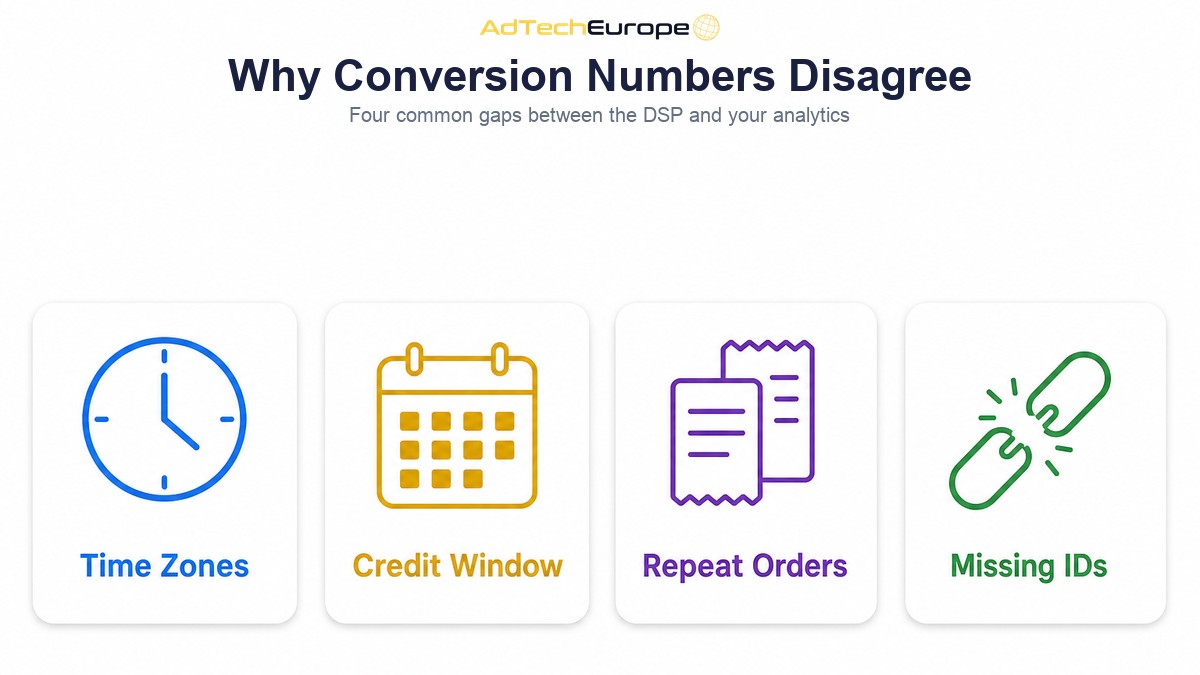
When the DSP, the tracker and the advertiser’s analytics show different conversion counts, the cause is usually one of a short list. Check them in this order.
Time zones and reporting dates
A DSP may report in UTC while the shop reports in local time. A sale at 23:30 in Athens lands on a different date in each system. Daily numbers will differ even when the monthly totals match.
Different attribution windows and models
A last-click DSP with a seven-day window and an analytics tool with a longer window and a data-driven model will credit the same sale in different ways. Compare like with like before deciding anything is broken.
Duplicate and repeat conversions
A thank-you page reloaded twice, or a postback retried after a timeout, can create two conversions from one order. Good tracking deduplicates by order ID. Without it, the DSP over-reports.
Lost click IDs
Redirect chains, URL shorteners, link-cleaning features or a landing page that strips query parameters can all drop the click ID. The sale still happens and the shop records it, but the DSP never sees it. This shows up as the DSP reporting fewer conversions than the shop.
Counting different events
One system counts every purchase. Another counts only first-time buyers. A third counts sign-ups. Make sure everyone has agreed on exactly which event is the conversion.
Consent and privacy rules
In Europe, a user who refuses consent may not be trackable with cookies at all. That reduces what pixels can see, and it affects attribution as much as targeting. Our guide to the TCF consent string explains how consent reaches a DSP.
Invalid traffic
Bots can click, and some fraud schemes fake conversions too. If one system filters invalid traffic and another does not, their counts will differ. Treat a sudden jump in cheap conversions from one placement with suspicion, not celebration.
How to Reconcile DSP and Analytics Numbers
You will never get every system to match exactly. The goal is to understand the gap and keep it stable. A practical checklist:
- Agree on one conversion event and one source of truth, usually the advertiser’s order system or tracker.
- Align time zones across the DSP, the tracker and analytics, or convert before comparing.
- Write down the attribution window and model in each tool.
- Click a live ad yourself and follow the click ID from the ad to the landing page to the order record.
- Send a test conversion and confirm the DSP matches it to the right campaign and placement.
- Deduplicate by order ID, and check postback retries are not double counting.
- Report click-through and view-through conversions in separate columns.
- Track the gap between systems weekly. A steady gap is normal. A sudden change means something broke.
Why Attribution Data Shapes Bidding
Conversion data is the input to every performance optimisation a DSP makes. Rules that raise bids on placements with a good cost per acquisition, or block placements that spend without converting, are only as good as the conversions they see.
Missing conversions make good traffic look bad, so the DSP cuts the very placements that work. Inflated conversions do the opposite and push budget into placements that only look good on paper. In both cases, fixing tracking often improves results more than any bid change, because the optimisation finally works with real data.
This is also why attribution should be checked before a campaign scales. A test budget hides small tracking gaps. A large budget multiplies them.
Why Owning Your Tracking Matters
When you rent media through someone else’s platform, you see their version of attribution. You cannot change the window, add a postback method, or inspect why a conversion was not matched. You also cannot easily take your conversion history with you if you move.
On your own DSP, attribution becomes something you control. AdTech Europe’s Tracking and Attribution add-on is built for this. According to its product page, it offers store plugins, a one-line site tag, server-to-server postbacks and automatic click IDs, deduplicates orders so one order is counted once, credits each sale to the campaign, placement and channel that earned it, sends conversions back to connected search and social channels, and runs conversion health checks that warn you when tracking stops reporting.
For agencies and ad networks, this matters commercially too. Clients trust a platform whose numbers they can verify. Owning the tracking layer, under your own brand, turns attribution from a source of arguments into part of what you sell.
Ready to Track Every Sale on Your Own DSP?
AdTech Europe helps agencies, ad networks, media-buying teams and adtech entrepreneurs own their programmatic platform instead of renting access to someone else’s. You can launch a white label DSP under your own brand and domain, add tracking and attribution, and keep full control of your data, rules and margins.
As of November 2026, you can rent the DSP for $500 a month (monthly plans carry a one-time setup fee equal to one month) or $5,000 a year, license it for $25,000 once or in 12 payments of $2,500, or own the complete source code for $50,000 once or in 12 payments of $5,000. Add-ons are priced separately. Current figures in every supported currency are on the pricing page.
Want to see how conversion tracking would work for your campaigns? Schedule a programmatic strategy meeting with our team.
FAQs
What is programmatic attribution?
Programmatic attribution is the process of linking a conversion, such as a sale or sign-up, to the programmatic ad impression or click that caused it. It tells the buyer which campaign, placement and creative deserve the credit.
What is a postback in programmatic advertising?
A postback is a server-to-server call that tells the DSP or tracker a conversion happened. The advertiser’s system sends the stored click ID to a postback URL, and the DSP matches it to the original click. It does not depend on the user’s browser.
Is a pixel or a postback better for conversion tracking?
A postback is usually more reliable because ad blockers and browser cookie limits do not affect it. A pixel is quicker to set up. Many advertisers use both, with the postback treated as the source of truth.
What is a view-through conversion?
A view-through conversion is credited to an ad the user saw but did not click, when they convert within a set view window. It is useful for video and CTV, but it is easy to over-count, so report it separately from click-through conversions.
Why does my DSP show different conversions from Google Analytics?
The most common reasons are different time zones, different attribution windows and models, lost click IDs, duplicate conversions and different definitions of a conversion. Align these first, then compare.
What is an attribution window?
An attribution window is the time after a click or view during which a conversion can still be credited to that ad. If a sale happens after the window ends, the ad does not get the credit.