Owning a DSP solves the access problem. It does not automatically solve the supply problem. A demand-side platform without connected supply-side platforms is an auction house with no inventory to sell, and new platform owners are often surprised by how much of the first few weeks after launch is spent on integration work rather than campaign strategy.
Every SSP connection is a small technical project: an endpoint to configure, a bid-response format to validate, a QPS allocation to negotiate, and a test campaign to run before real budget touches the connection. Get it wrong and a platform owner ends up with thin fill rates, mismatched currencies, or a connection that silently stops sending bid requests weeks after it was approved. Get it right once and the same checklist applies to the next hundred SSPs.
This guide walks through what SSP integration actually involves, the technical requirements a DSP needs to have in place before reaching out to any supply partner, a step-by-step checklist for connecting and validating a new SSP, and the tradeoffs between building each connection manually and starting with a platform that already has supply pre-integrated.
What SSP Integration Actually Means for a DSP Owner
An SSP sits on the publisher side of the auction, packaging ad inventory into bid requests and sending them out to connected DSPs over OpenRTB. Integrating with an SSP means setting up a two-way channel: the SSP needs to know where to send bid requests, and the DSP needs to know how to parse, price, and respond to them fast enough to matter.
In practice this is a mix of protocol work and business setup. On the protocol side, the DSP exposes an OpenRTB-compliant endpoint that can accept the SSP’s bid request format, respond inside the auction’s timeout window, and handle whatever extensions that particular SSP uses for viewability data, user identifiers, or supply chain fields. On the business side, someone has to agree on QPS allocation, floor price handling, payment terms, and which inventory categories are actually being shared.
Most SSPs will not hand a brand-new, unproven DSP full access on day one. They start with a limited QPS cap and a narrow slice of inventory, watch how the connection performs, and expand access once the DSP demonstrates it can bid, win, and pay reliably. That ramp-up period is normal and it is one of the reasons a DSP with a long list of pre-vetted supply relationships has a real head start over one starting from zero.
Technical Requirements Before You Contact an SSP
Before reaching out to any supply partner, a DSP needs a short list of technical fundamentals in place. Most integration delays trace back to one of these being missing or incomplete when the SSP’s technical team starts reviewing the connection.
| Requirement | Why it matters |
| OpenRTB-compliant bid endpoint | The SSP needs a stable URL that accepts its bid request format and returns a valid bid response or a no-bid within the timeout window. |
| Sub-100ms average response time | Most SSPs enforce strict timeouts. A DSP that responds too slowly gets throttled or dropped from the auction entirely, regardless of bid price. |
| ads.txt / sellers.json awareness | The DSP’s buying logic should be able to check that the SSP is an authorized seller for the inventory it is offering, to avoid buying misrepresented traffic. |
| Currency and timezone handling | SSPs report spend and impressions in different currencies and reporting windows. Mismatched settings quietly break reconciliation later. |
| A test/QA traffic mode | Every new SSP connection needs to run on a small test budget before it is trusted with real campaign spend. |
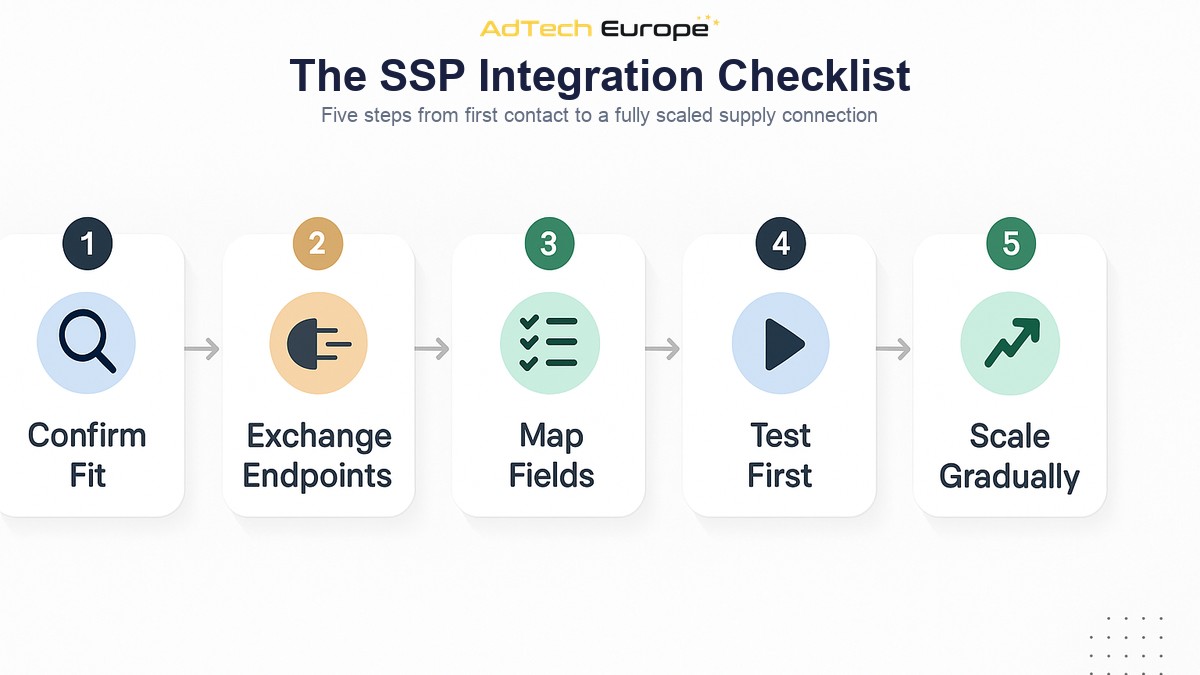
The SSP Integration Checklist, Step by Step
Once the technical fundamentals are in place, connecting an individual SSP follows a fairly consistent sequence. Skipping steps to launch faster is the single most common cause of connections that look fine on paper but underperform once real spend flows through them.
- Confirm inventory fit. Check what formats, regions, and device types the SSP actually carries before starting technical setup, so the integration is worth the engineering time.
- Exchange endpoint details. Share the DSP’s bid endpoint and receive the SSP’s documentation, sample bid requests, and any custom OpenRTB extensions it uses.
- Map the bid request and response fields. Confirm required fields, floor price formatting, and any non-standard fields the SSP expects in the response.
- Agree on an initial QPS allocation. New connections almost always start capped, with room to scale as performance is proven.
- Run a test campaign on a small budget. Validate that bids are being sent, won impressions actually render, and reporting numbers match between both sides.
- Check ads.txt / sellers.json authorization on live domains. Confirm the SSP is listed as an authorized seller for the publishers it claims to represent.
- Reconcile spend and impression counts. Compare the DSP’s logs against the SSP’s reporting for the test period before scaling budget.
- Scale QPS and budget gradually. Increase allocation in steps rather than switching a new connection straight to full volume.
- Add the connection to ongoing monitoring. Track fill rate, win rate, and latency on a recurring basis, since SSP performance can drift over time without any change on the DSP side.
Direct SSP Integration vs Working Through an Aggregator
DSP owners generally reach supply through one of two routes: connecting directly to individual SSPs one at a time, or connecting once to an ad exchange or supply aggregator that has already integrated a large number of SSPs behind a single endpoint. Both routes are valid, and most established DSPs end up using a mix of the two.
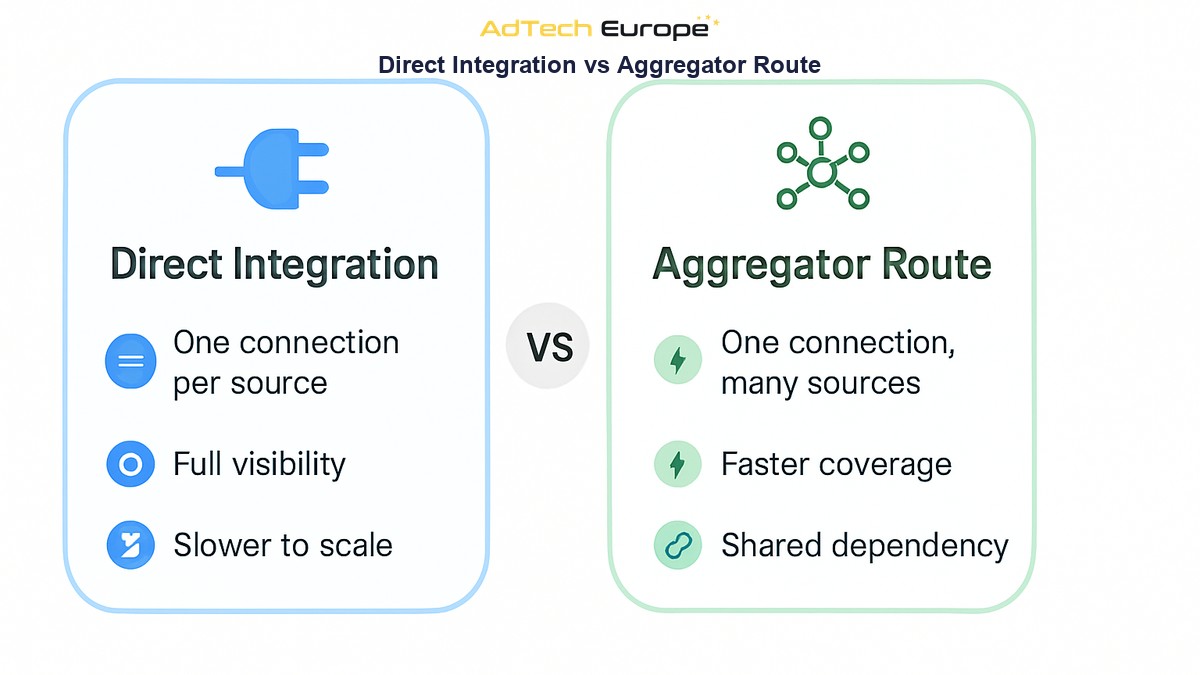
| Direct SSP Integration | Aggregator / Ad Exchange Route |
| One dedicated integration per SSP | One integration exposes many SSPs at once |
| Full visibility into each supply source | Some supply-path visibility depends on the aggregator’s transparency |
| Slower to reach broad coverage | Faster path to scale across many SSPs |
| More engineering time per new source | Ongoing dependency on the aggregator’s uptime and terms |
Direct integrations tend to make sense for a small number of high-value, high-volume SSPs where the extra visibility and control are worth the engineering time. The aggregator route is what makes it realistic for a new DSP to reach broad inventory coverage in weeks instead of the months it would take to negotiate and build hundreds of direct connections one by one. This is also where supply path optimization becomes relevant: the goal is not simply to connect to as many SSPs as possible, but to route each impression through the shortest, cleanest path available once multiple sources overlap.
Common Mistakes That Slow Down or Break SSP Connections
- Skipping the test-campaign step and pushing full budget through a brand-new connection immediately.
- Ignoring timeout and latency requirements until an SSP starts silently throttling the connection.
- Never re-checking ads.txt / sellers.json authorization after the initial setup, missing when a supply source changes.
- Treating every SSP’s OpenRTB implementation as identical, when custom fields and extensions vary from one to the next.
- Leaving QPS caps untouched long after a connection has proven it can handle more volume, leaving fill rate on the table.
How Many SSPs Does a New DSP Actually Need?
There is no fixed number, but coverage matters more than any single connection. A handful of SSPs can support a narrow test campaign, but a DSP that wants to run display, video, in-app, and CTV inventory across multiple regions needs supply diversity, not just supply volume. Relying on one or two SSPs also creates a single point of failure: if one connection has an outage or a fill-rate drop, campaigns running through it stall.
This is the practical reason many DSP owners choose a platform that comes with supply already integrated rather than building every connection from a blank slate. AdTech Europe’s White Label, License, and Acquisition plans all ship with 1,000+ SSP integrations and unlimited QPS scaling already in place, which turns months of one-by-one integration work into a platform that has supply on day one. Owners who want to add their own direct relationships on top of that baseline are still free to do so, and the checklist above still applies to each one.
The pre-integrated route also works from the other direction. Supply-side platforms and ad networks that want to plug their own inventory into a large pool of demand instead of chasing individual DSP relationships can go through the same kind of pre-built connection, which is how AdTech Europe’s own supply partners typically connect their inventory to the platform’s demand pool. On the buy side, a new DSP owner going the acquisition or license route can expect the equivalent onboarding, with AdTech Europe able to connect a DSP to ready ad supply in about five business days rather than the weeks or months a from-scratch integration schedule usually takes.
Ready to Skip the Manual SSP Integration Work?
AdTech Europe helps agencies, ad networks, and media-buying teams own a DSP instead of renting access to one, with platforms that come pre-connected to more than 1,000 SSPs, unlimited QPS, and full white-label branding out of the box. Whether the goal is a fully managed white-label platform, a licensed DSP, or full source-code acquisition, the supply integration work described in this guide is already done before the platform reaches a new owner. Current pricing for each ownership model is published and kept up to date, so the cost of skipping the manual integration work is easy to weigh against building it in-house.
To see the pre-integrated supply and QPS setup in action, or to talk through a self-build versus ready-platform approach for a specific use case, schedule a programmatic strategy meeting with the AdTech Europe team.
FAQs
How long does it take to connect a new SSP to a DSP?
A single direct SSP integration typically takes anywhere from a few days to a few weeks, depending on how standard the SSP’s OpenRTB implementation is and how quickly both sides can run and validate a test campaign.
What is the difference between OpenRTB and a proprietary bidding API?
OpenRTB is an industry-standard protocol for real-time bid requests and responses that most SSPs and DSPs support, which makes integrations faster and more predictable than working with a fully proprietary, non-standard API.
Do I need to check ads.txt and sellers.json for every SSP connection?
Yes. Checking that an SSP is listed as an authorized seller helps confirm the inventory it offers is legitimate, and it should be checked again periodically, not just once during initial setup.
Why do SSPs limit QPS for new DSP connections?
SSPs cap QPS for unproven connections to protect their infrastructure and to see how a new DSP performs before allocating more bid request volume to it. Allocation typically increases once the DSP shows reliable response times and payment.
Is it better to integrate directly with SSPs or through an ad exchange?
It depends on scale and priorities. Direct integrations offer more visibility and control over specific high-value supply sources, while an ad exchange or aggregator route reaches broad supply coverage much faster with less engineering overhead.
Does a white label DSP come with SSPs already connected?
Yes, in AdTech Europe’s case. White Label, License, and Acquisition plans all include more than 1,000 pre-integrated SSPs and unlimited QPS scaling, so a new owner does not have to build supply connections from scratch.
What happens if an SSP connection stops sending bid requests?
It usually signals either a technical issue on one side (an expired endpoint, a timeout problem) or a business change on the SSP’s side (inventory pulled, an account review). Ongoing monitoring of fill rate and request volume per SSP is what catches this quickly instead of weeks later.